为什么有些小主机不插视频线就无法开机?
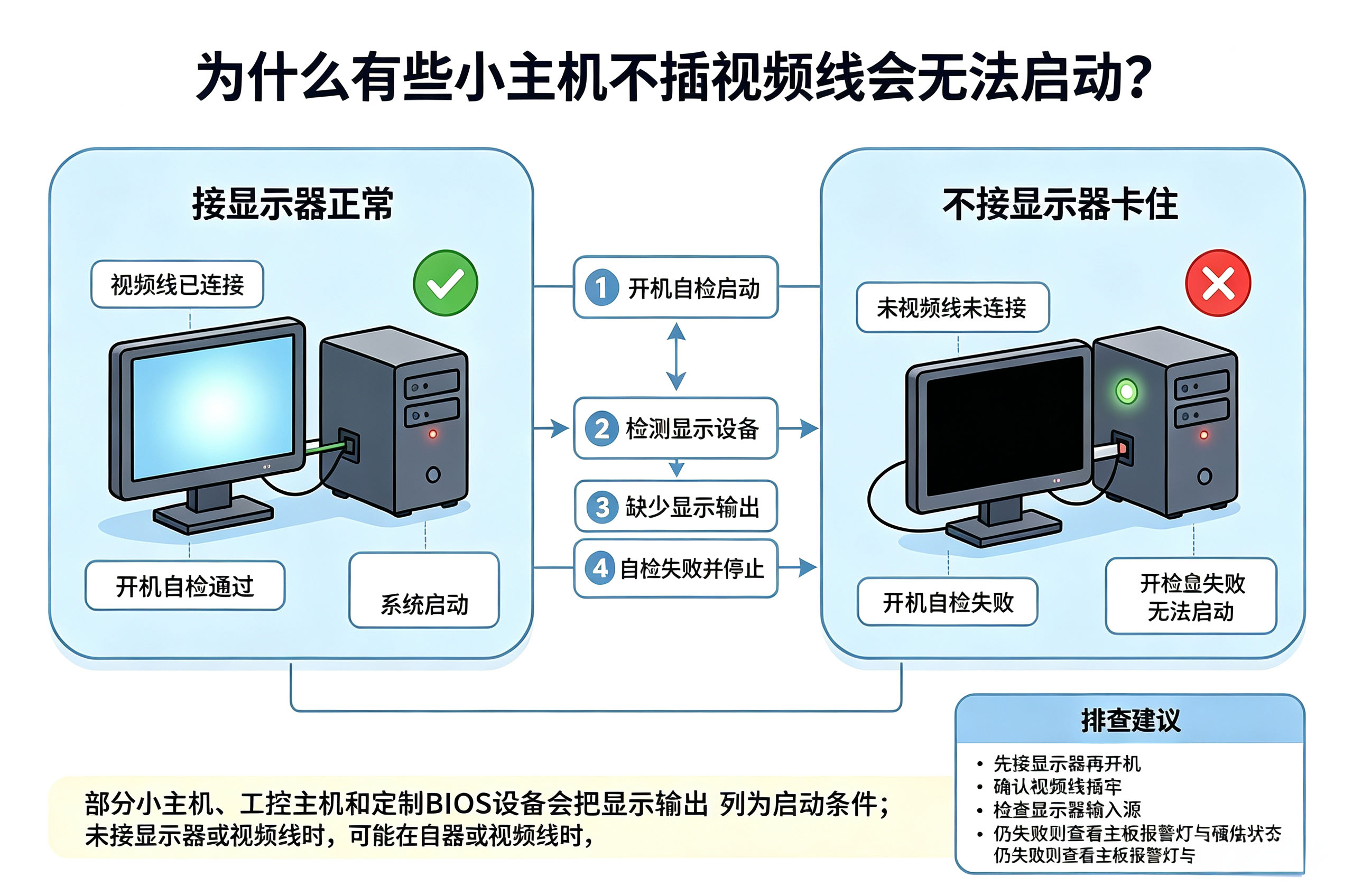
适用于: J1900 / 工控机 / OEM 嵌入式小主机做 Linux 服务器(如 Debian / Ubuntu)时的经典痛点 —— 拔掉显示器后无头启动(Headless)失败,出现无法开机、自检卡死或无限重启的问题。
一、核心原因分析
该现象通常发生在系统启动的两个不同阶段:
- BIOS / UEFI 硬件自检(POST)限制
许多较老或特定定制的 BIOS 固件在开机加电自检阶段,会硬性检测显示输出接口(HDMI / VGA)。若未检测到有效的 EDID(显示器识别)信号或设备,主板会认为显卡自检不通过,从而触发保护机制导致程序挂起或循环重启。 - Linux 内核与显卡驱动冲突
进入操作系统加载阶段后,Intel 显卡驱动(如i915)在无显示器环境下若拿不到正确的显示参数,极易导致驱动初始化失败、系统挂起,并伴随 ACPI 或 Watchdog 超时报错。
二、解决与优化方案
1. 修改 GRUB 引导参数(软件优化,推荐首试)
通过调整系统的 GRUB 引导参数,禁用显卡驱动的动态模式设置(KMS)并规范控制台输出,即可在不插 HDMI 视频线的情况下正常开机:
编辑 GRUB 配置文件:
sudo nano /etc/default/grub修改/合并内核默认引导参数:
GRUB_CMDLINE_LINUX_DEFAULT="quiet reboot=bios nomodeset text"确保清空备用参数行:
GRUB_CMDLINE_LINUX=""强制开启文本模式终端(不依赖图形终端):
GRUB_TERMINAL=console保存并更新 GRUB 配置使之生效:
sudo update-grub
核心参数作用解析:
reboot=bios:解决部分老主板关机或重启时触发 Watchdog 导致卡死的问题。nomodeset text:强制内核采用基础文本模式,避免因无显示器导致显卡驱动初始化崩溃。GRUB_TERMINAL=console:确保引导与系统输出不依赖图形终端。
2. 硬件兜底方案:HDMI 虚拟显示器插头(Dummy Plug)
若主板 BIOS 固件存在无法通过软件绕过的硬件级 POST 检测,可使用物理兜底方案:
购买一个几块钱的 HDMI 虚拟显示器(欺骗器/插头) 插在主板 HDMI 口上。它会持续向主板发送伪造的 EDID 信号,欺骗 BIOS 完成正常开机自检。
三、SSH 远程管理注意事项
小主机实现无头启动后,通过 SSH 远程管理时,若执行关机或重启命令提示 command not found,请注意命令规范:
| 错误做法 / 现象 | 正确操作命令 | 原因说明 |
|---|---|---|
直接输入 reboot 或 poweroff提示 command not found | sudo reboot或 sudo poweroff | 普通用户通过 SSH 登录时,默认环境变量 PATH 不包含系统管理路径 /sbin 或 /usr/sbin,需通过 sudo 提权调用。 |
总结: 先试 GRUB 参数调优(reboot=bios nomodeset text+GRUB_TERMINAL=console),绝大多数老平台即可顺利实现无头启动;若仍被主板 BIOS 拦截,使用 HDMI Dummy Plug 插头兜底即可。